
Twilio Flex has been one of the more flexible ways to run a contact center inside Salesforce. Its Salesforce connector embeds the full Flex agent interface and has relied on Salesforce Open CTI to do it. Twilio’s documentation now says plainly that this integration has an end date.
Key facts at a glance
- Twilio’s docs say Open CTI implementations, including the Flex integration, will no longer function after February 28, 2028.
- Twilio’s Salesforce Service Cloud Voice integration went GA on AgentExchange (changelog dated March 31, 2026).
- Partner Contact Center with Twilio supports the voice channel. SMS and WhatsApp are set up separately through a BYOC guide.
- Twilio says the Partner Contact Center integration is not HIPAA eligible or PCI compliant.
The good news is that a supported replacement already exists. The less obvious news is that it works quite differently, so Flex teams should look at it closely before they schedule a cutover.
What Twilio’s docs now say
The Integrate Flex with Salesforce guide carries a warning at the top: Salesforce Open CTI is scheduled for retirement on February 28, 2028, and implementations that use Open CTI, including the Flex integration, will no longer function after that date. Twilio asks customers to contact their account executive for guidance and migration options.
That matches the Salesforce retirement notice, which also says new Agentforce Service orgs can no longer implement Open CTI at all.
What the current Flex connector does
It is worth listing what you have today, because that is what you will be replacing. Twilio describes the Open CTI connector as supporting voice, web chat, SMS and WhatsApp, routing any Salesforce object, click-to-dial, screen pop with search, activity logging and SSO. It also allows a programmable, customized look and feel, and it can run with Flex embedded in Salesforce or Salesforce embedded in Flex.
The replacement: Partner Contact Center with Twilio
In a changelog entry dated March 31, 2026, Twilio announced that its Salesforce Service Cloud Voice integration was generally available and listed on AppExchange. That release added external call transfers, supervisor barge and listen, and a toggle for real-time transcription.
Twilio’s Partner Contact Center setup guide lists inbound calling through TaskRouter, outbound dialing via Dialpad and click-to-dial, Studio IVR, real-time transcription through Conversation Intelligence (classic), call recording and playback in Salesforce, Omni-flow automation for voice call records, supervisor barge-in and listen, and external transfers. Real-time and historical reporting stay in Twilio Console and Flex UI.
The differences that matter most
Channels. The Partner Contact Center integration supports the voice channel. To bring Twilio SMS and WhatsApp into Salesforce Messaging, Twilio points to a separate BYOC (Bring Your Own Channel) setup guide. Web chat is not covered in the voice guide, so check your current chat flows carefully.
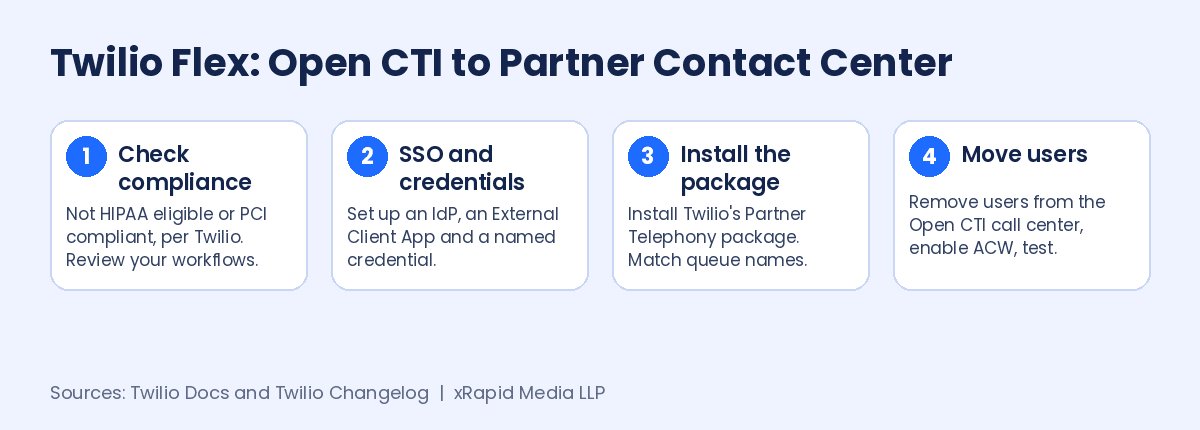
Compliance. Twilio states that Twilio for Salesforce Partner Contact Center is not a HIPAA Eligible Service or PCI compliant, and should not be used in workflows that are subject to HIPAA or PCI. For healthcare, insurance or payments teams, that may decide the question on its own.
Setup. You need SSO for both Flex and Salesforce, using Salesforce, Okta or another SAML 2.0 identity provider. Twilio notes that Salesforce restricted the creation of new connected apps as of Spring 2026, so you create an External Client App instead. You also create external and named credentials with your Twilio Account SID and Auth Token. Twilio says restricted API keys do not yet work with the newer features.
Agent capacity. An open VoiceCall tab keeps using an agent’s capacity after the call ends. Twilio recommends turning on After Conversation Work so capacity is released when the timer ends.
Cutover. Salesforce users can belong to only one call center or contact center at a time. If users sit in an Open CTI call center today, you have to remove them before you add them to the new contact center, which makes a phased, team-by-team move the natural approach.
What this means for your contact center
- Start with compliance. If any calls touch HIPAA or PCI workflows, confirm your options with Twilio before you build anything.
- Map every channel. List voice, SMS, WhatsApp and chat flows separately, since they move through different setups.
- Plan the identity work. SSO, External Client Apps and named credentials need your security team involved early.
- Match queue names. Twilio says Salesforce and Twilio queues must share names for supervisor queue mapping to work.
- Phase the move. The one-call-center rule makes pilots by team the safest path.
If you are comparing vendors while you rebuild, Partner Contact Center Powered by Vonage runs on Salesforce Voice, and Vonage Contact Center for Salesforce brings voice, video, WhatsApp, SMS, chat and email into the same Salesforce workspace.
Planning your Open CTI migration?
xRapid Media LLP is a High Tech B2B Marketing company and Vonage channel partner. Book a free consultation with a Vonage contact center expert with 20 years of experience, and we will help you compare your options and map a clear, low-risk path to Salesforce Voice, with voice, video, WhatsApp, SMS, chat and email in one workspace.
Get a free Vonage consultation More Open CTI migration news →