
Most SaaS and IT companies know they need content to be found in search. Fewer realize that content can be held back by problems buyers never see: pages search engines can’t crawl, duplicate URLs competing with each other, or slow templates that frustrate visitors on their first click.
That’s what technical SEO is about. It’s the foundation that lets your product pages, solution pages and blog posts compete fairly. You don’t need to be a developer to understand the basics, and most of the fixes are straightforward once you know where to look. Here’s what our team checks first on B2B tech websites.
Why technical SEO matters for B2B tech companies
B2B buyers research a lot before they talk to sales. They search for problems, compare options and read several pages from the same vendor. If your key pages aren’t indexed, or Google shows the wrong version of a page, you lose those early touchpoints to competitors.
Tech company websites also tend to have extra complexity: documentation sites, app login pages, staging environments, pricing pages that change often and marketing pages built by several teams over the years. Each of these can create technical issues if nobody is keeping an eye on them.
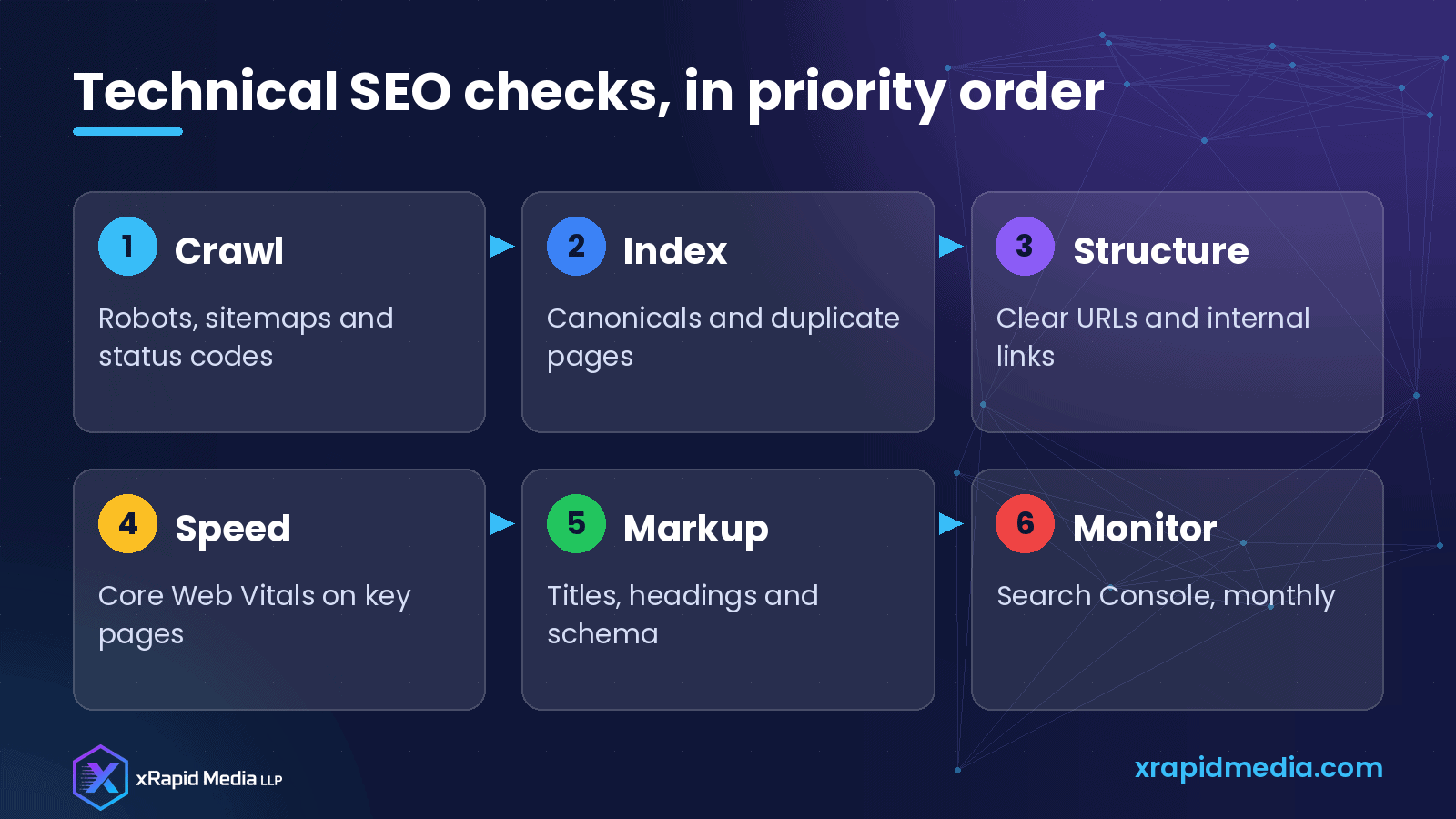
1. Make sure search engines can crawl your site
Start with the basics:
- Robots.txt: Check that it isn’t accidentally blocking important sections. It’s common to find a rule left over from a staging site or an old redesign.
- XML sitemap: Make sure you have one, that it lists your important pages and that it’s submitted in Google Search Console.
- Status codes: Find broken links (404 errors) and redirect chains. A page that redirects three times before loading wastes crawl effort and slows visitors down.
Free and paid crawling tools can scan your site and list these issues in a few minutes.
2. Control what gets indexed
Not every page on your domain should appear in search results. Login pages, thank-you pages, internal search results and test pages usually shouldn’t. At the same time, your important pages absolutely should.
Two tools help here:
- Noindex tags tell search engines not to include a page in results.
- Canonical tags tell search engines which version of a page is the main one when similar versions exist, for example the same page with tracking parameters added to the URL.
Google Search Console’s page indexing report shows which pages are indexed and why others aren’t. It’s one of the most useful reports for spotting problems early.
3. Keep your site structure clear
Search engines and buyers both understand your site better when it’s organized logically. For a SaaS or IT services company, that often means:
- Clear sections for products or services, solutions by industry or use case, pricing, resources and company information.
- Short, readable URLs like /solutions/healthcare/ rather than long strings of parameters.
- Internal links between related pages, such as linking a blog post about cloud migration to your cloud migration service page.
Internal links are often overlooked. They help search engines discover pages and understand which ones matter most, and they guide visitors toward the pages that convert.
4. Fix speed on the pages that matter
Page speed affects both user experience and search performance. Google measures real-world experience through Core Web Vitals, which look at loading, responsiveness and visual stability.
Rather than chasing a perfect score on every page, focus on the pages buyers actually land on: your homepage, main service or product pages, top blog posts and landing pages for campaigns. Common fixes include compressing large images, removing unused scripts, limiting heavy third-party widgets and using good caching.
5. Get the on-page markup right
Each important page should have:
- A unique, descriptive title tag that includes the main topic.
- A meta description that explains what the reader will get.
- One clear H1 heading and logical subheadings.
- Descriptive alt text for meaningful images.
Structured data, also called schema markup, can help search engines understand certain content types, such as articles, FAQs, products, software applications and organization details. Use it accurately, and only for content that’s actually on the page.
6. Watch out for common tech company issues
A few problems come up again and again on B2B tech sites:
- Documentation or help centers on a separate subdomain with no links back to the main site.
- Multiple pages targeting the same keyword, such as several nearly identical “cloud consulting” pages.
- JavaScript-heavy pages where important text only appears after scripts run.
- Old product pages for retired offerings that still get traffic but lead nowhere.
For retired pages, redirect them to the closest relevant current page rather than letting them break.
7. Monitor it every month
Technical SEO isn’t a one-time project. New pages get added, plugins update and redesigns happen. A monthly check of Search Console for indexing issues, crawl errors and Core Web Vitals warnings will catch most problems before they hurt your traffic.
Wrapping up
Technical SEO is the plumbing behind your B2B marketing. When it works, your content has a fair chance to rank and buyers can find the pages that answer their questions. Start with crawling and indexing, tidy your structure, speed up your most important pages and check in every month. These fixes aren’t glamorous, but they make every other marketing effort work harder.
About xRapid Media
xRapid Media LLP is a High Tech B2B Marketing company for technology businesses: software and SaaS companies, IT services and managed service providers, and hardware and IT product vendors. Our team combines positioning and content, account-based marketing, paid ads funnels, verified B2B data, intent signals, email and LinkedIn outreach and appointment setting to help you reach the right buyers and turn their attention into qualified leads and meetings.
Want help putting ideas like these into practice? Email [email protected] or book a time with our team.