

For most B2B software and IT companies, the “Book a demo” button is the most important call to action on the website. It’s the moment a curious visitor raises a hand and says, “I want to talk.”
Yet it’s often the least loved page on the site. Long forms, vague promises, no scheduling and slow follow-up quietly push good buyers away. The good news is that most of these problems are easy to fix.
Here’s how our team approaches demo request pages for tech companies.
Start with what the buyer wants to know
Before someone fills in a form, they want answers to a few simple questions:
- What will I see in the demo?
- How long will it take?
- Who will I talk to: a salesperson, a product expert or both?
- Will this be tailored to my situation, or a generic walkthrough?
Put these answers right above or beside the form. A short list such as “30 minutes, a live walkthrough focused on your use case, with time for questions” sets expectations and lowers anxiety.
Ask for less information
Every field you add is another reason to leave. Many demo forms ask for phone number, company size, budget, timeline, job title, industry and a free-text message, all at once.
Ask only for what you truly need to route and prepare for the call. For many teams that’s name, work email, company and one qualifying question. You can enrich the rest with B2B data tools or collect it during the conversation.
If you need more detail for qualification, consider a two-step form: basic details first, then a few optional questions once the person has committed.
Let people book a time right away
One of the biggest drop-off points happens after the form is submitted. The visitor sees “Thanks, someone will be in touch,” and then waits. By the time a rep emails back, the buyer may have booked a demo with a competitor.
Embedding a scheduling tool directly after the form lets qualified visitors pick a time immediately. Many scheduling tools can route meetings to the right rep based on territory, company size or product interest.
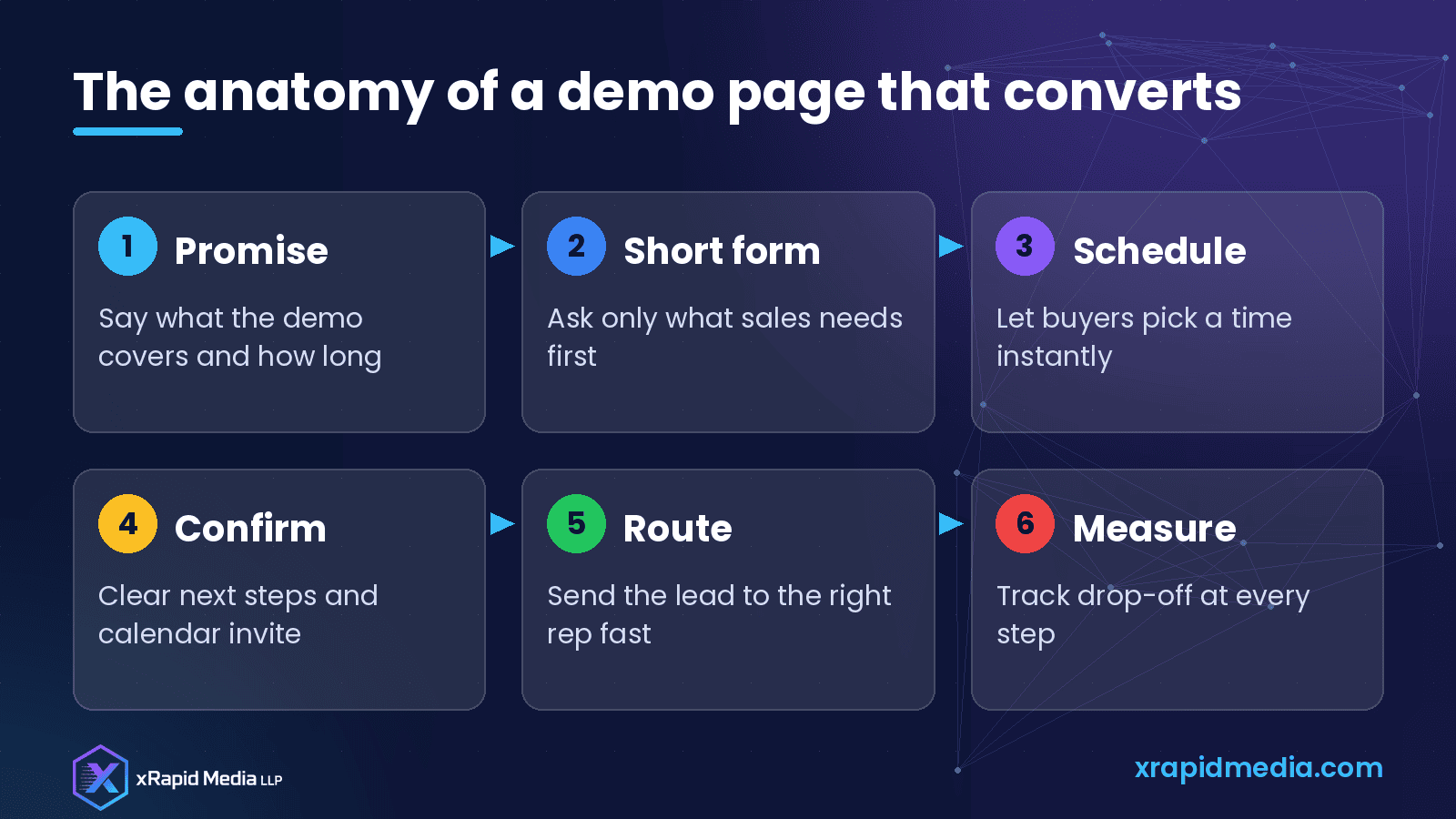
Make the confirmation do real work
The thank-you page and confirmation email are often wasted. Use them to:
- Confirm the date, time and meeting link
- Introduce the person who will run the demo, with a short bio
- Share one or two short resources, such as a customer story or product overview
- Ask an optional question that helps you tailor the session
Calendar invites should have a clear title, such as “Product demo: [Your company] + [Their company],” so the meeting is easy to recognize later.
Reduce friction on mobile
Many buyers browse on their phones, even for B2B purchases. Test your demo page on a small screen. Make sure form fields are large enough to tap, the keyboard type matches the field (email keyboards for email fields, for example) and the scheduling widget is usable without zooming.
Also check page speed. Heavy scripts, chat widgets and tracking tags can slow down the page that matters most.
Add proof near the form
At the moment of decision, a bit of reassurance helps. Consider adding:
- A short customer quote from a recognizable type of company
- Logos of customers who have agreed to be featured
- Security or compliance badges you actually hold
- A note on response time, if you can honestly commit to one
Only use proof that’s real and approved. Invented testimonials or badges you don’t hold will hurt trust, and can create legal problems.
Route and respond fast
Speed matters. When a demo request comes in, it should reach the right person immediately, through your CRM, a team channel or both. Set up alerts so nobody has to refresh an inbox to notice a new lead.
If you can’t offer instant scheduling, aim to respond during business hours as quickly as possible, and be consistent. A fast, personal reply often makes a strong first impression.
Measure the whole journey
Look beyond “number of demo requests.” Track:
- Visits to the demo page
- Form starts and form completions
- Scheduled meetings
- Meetings that actually happen (show rate)
- Meetings that turn into opportunities
Each drop-off point tells you something. Many form starts but few completions suggests the form is too long. Many bookings but low show rates suggests your confirmation and reminder process needs work.
A quick audit you can run today
- Open your demo page on your phone and try to book a demo
- Count the form fields and remove any you don’t need right away
- Check what happens after you submit: is there a next step?
- Look at the confirmation email: does it tell the buyer what to expect?
- Check how long it took for a real person to respond to the last ten requests
Turn interest into pipeline
Your demo page is the bridge between marketing and sales. Small improvements here often have an outsized effect on pipeline, because the visitors are already interested.
At xRapid Media LLP, we help tech companies build websites, landing pages and funnels that turn traffic into qualified meetings. If you’d like a second opinion on your demo flow, book a free B2B marketing consultation and we’ll walk through it with you.
About xRapid Media
xRapid Media LLP is a High Tech B2B Marketing company for technology businesses: software and SaaS companies, IT services and managed service providers, and hardware and IT product vendors. Our team combines positioning and content, account-based marketing, paid ads funnels, verified B2B data, intent signals, email and LinkedIn outreach and appointment setting to help you reach the right buyers and turn their attention into qualified leads and meetings.
Want help putting ideas like these into practice? Email [email protected] or book a time with our team.