

Every B2B tech buyer has seen the email. It opens with “I hope this finds you well,” praises the company’s “impressive growth,” and then pitches something that has nothing to do with the reader’s job. More and more of these emails are written by AI, and buyers can tell.
That doesn’t mean AI has no place in outbound. Used well, it can do the slow parts of personalization, like research, summarizing and first drafts, so your team can spend its time on judgment. Used badly, it just produces more noise, faster.
Here’s the approach our team uses when we help software, SaaS and IT services companies run outreach.
Why most AI-written outreach falls flat
The problem usually isn’t the AI model. It’s what goes in. If you give a tool nothing but a company name and a job title, it will fill the gaps with generic flattery. The output sounds personal but says nothing specific.
The other common mistake is skipping review. AI tools can misread a website, confuse two companies with similar names or state something that simply isn’t true. One wrong “fact” in a cold email can end a conversation before it starts.
Good AI outreach starts with good inputs and ends with a human check.
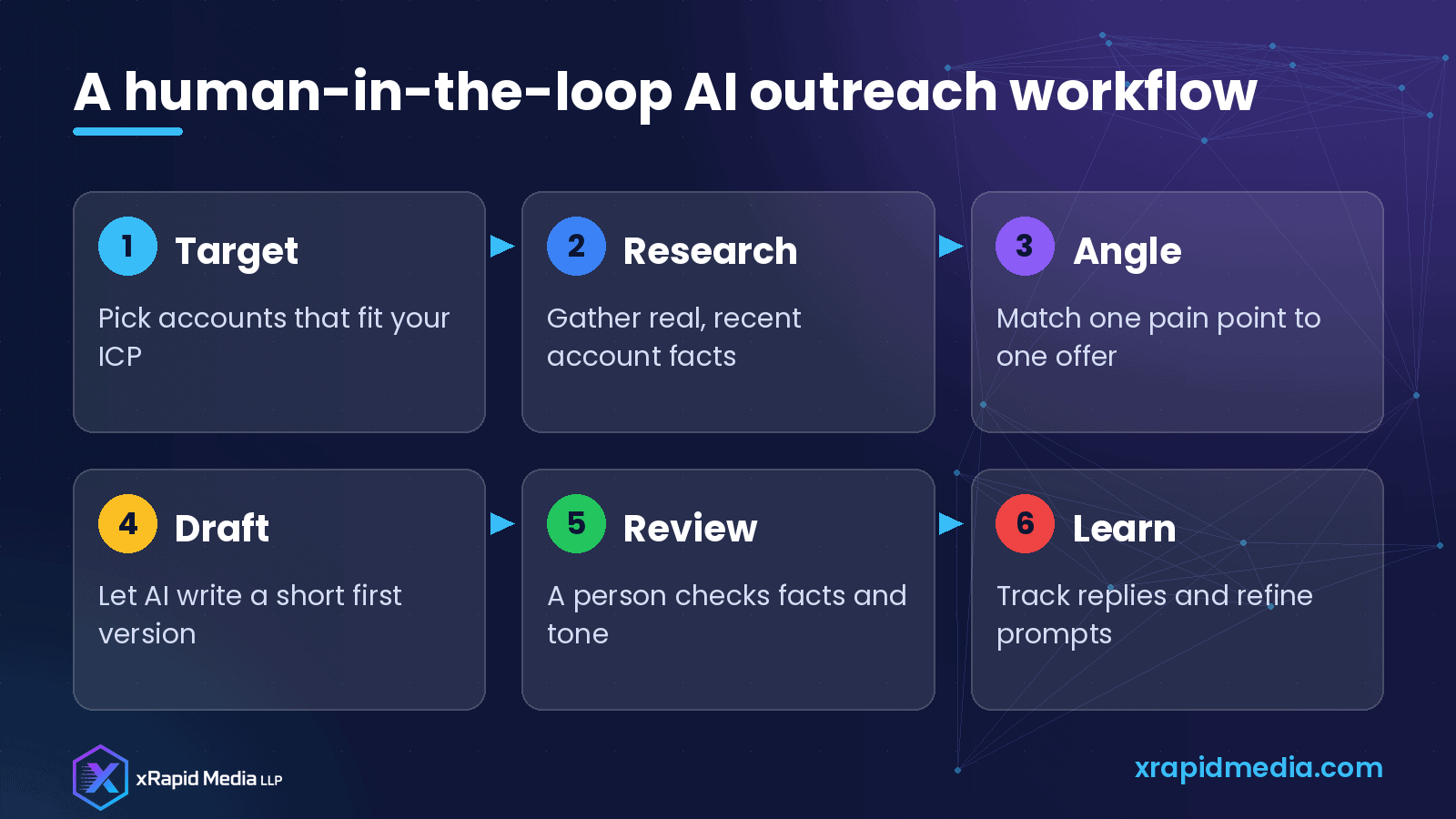
Step 1: Start with the right accounts
Personalization can’t rescue a bad list. Before any writing happens, make sure each account fits your ideal customer profile: industry, size, tech stack, region and a reason they might need you now.
If you sell a security product for Microsoft 365 environments, for example, a company that recently posted jobs for an IT security lead and runs Microsoft 365 is a much stronger target than a random company in the same industry.
Step 2: Feed the AI real, recent facts
The best personalization comes from details your prospect would recognize. Useful sources include:
- The company’s own website, product pages and press releases
- Recent job postings, which often reveal priorities and tools
- Public posts by the contact or the company on LinkedIn
- Partner directories and marketplace listings
- Your own CRM notes from earlier conversations
Collect a few facts per account, with links, and give those to the AI tool. Ask it to use only the information provided. This one instruction removes a lot of the made-up details that make AI emails feel off.
Step 3: Pick one angle per email
A strong cold email connects one thing you noticed to one problem you solve. Not three features. Not your entire company history.
A simple structure works well:
- One line that shows you did your homework
- One line about a problem that usually comes with that situation
- One line about how you help, ideally with a relevant example
- One low-pressure question or next step
Tell the AI tool to follow that structure and to keep the email short. Short emails are easier to read on a phone and easier to answer.
Step 4: Let AI draft, then edit like a human
Ask for two or three versions and pick the best one. Then edit. Remove anything that sounds like marketing copy. Check that every fact matches your research. Read it out loud: if it sounds like something you’d never say to a person, change it.
Step 5: Keep your sending habits clean
Personalized emails still need good sending practices. Send from a properly authenticated domain with SPF, DKIM and DMARC in place. Space out your sends instead of blasting hundreds at once. Keep a clear way for people to opt out, and respect it. Laws and rules for commercial email differ by country, so check what applies to the regions you target.
Mailbox providers watch how recipients react. Emails that get replies and don’t get marked as spam help your reputation. Mass, generic emails do the opposite.
Step 6: Build a prompt library from what works
Track which emails get replies and which don’t. When a certain opening line or angle works for a segment, save the prompt and the edited email as a template. Over time you’ll have a small library of proven prompts for each persona, like IT directors, CISOs or heads of customer support.
Share it with the whole team so everyone benefits from what one rep learned.
Where AI helps most in outbound
In our experience, AI saves the most time on:
- Summarizing a company’s website and recent news into a few bullet points
- Suggesting likely pain points based on role and industry
- Writing first drafts and subject line options
- Rewriting an email for a different persona
- Drafting polite follow-ups that add something new
It helps least with deciding who to contact, judging whether a fact is accurate and knowing when not to send. Those are still human jobs.
Common mistakes to avoid
- Letting AI write and send without anyone reading the email
- Using fake familiarity, such as “loved your recent post,” when nobody read it
- Writing long emails that try to explain everything
- Sending the same AI template to thousands of contacts
- Forgetting to update your CRM with what you learned
Getting started this week
Pick one segment of 30 to 50 accounts. Gather a few real facts for each, use AI to draft emails with the simple structure above, review every email and send them in small batches. Measure replies, not just opens. Then improve your prompts and repeat.
If you’d like help building an outreach program that combines verified B2B data, AI-assisted research and human-reviewed messaging, our team at xRapid Media LLP can help. We work with tech companies every day on email and LinkedIn outreach and appointment setting. Book a free B2B marketing consultation and we’ll look at your current approach together.
About xRapid Media
xRapid Media LLP is a High Tech B2B Marketing company for technology businesses: software and SaaS companies, IT services and managed service providers, and hardware and IT product vendors. Our team combines positioning and content, account-based marketing, paid ads funnels, verified B2B data, intent signals, email and LinkedIn outreach and appointment setting to help you reach the right buyers and turn their attention into qualified leads and meetings.
Want help putting ideas like these into practice? Email [email protected] or book a time with our team.