

Ask a contact center manager what they fear most about leaving Open CTI and the answer is often not the softphone. It is the Monday morning dashboard. Years of call reports are built on Task records, and Salesforce Voice stores calls differently. If that switch is left to the last week, managers can lose visibility right when they need it most.
Key facts at a glance
- Salesforce says VoiceCall is the primary reporting object for Salesforce Voice with Partner Telephony.
- Call duration maps to VoiceCall.CallDurationInSeconds and queue wait time to VoiceCall.CallWaitTime.
- Transfers are tracked as VoiceCallParticipant child records, and recordings through VoiceCallRecording.MediaDocumentId.
- Open CTI reaches end of life on February 28, 2028.
The good news is that Salesforce has published a direct field mapping. Here is how to use it.
Why reporting has to change
Salesforce’s retirement notice says Open CTI reaches end of life on February 28, 2028. Salesforce’s developer migration guide explains a core difference between the two models: Open CTI integrations typically log calls as Task records, while Salesforce Voice uses VoiceCall records.
The guide’s Migrate Reporting page is short but specific: VoiceCall is the primary reporting object for Salesforce Voice with Partner Telephony, now called Partner Contact Center.
Salesforce’s field mapping
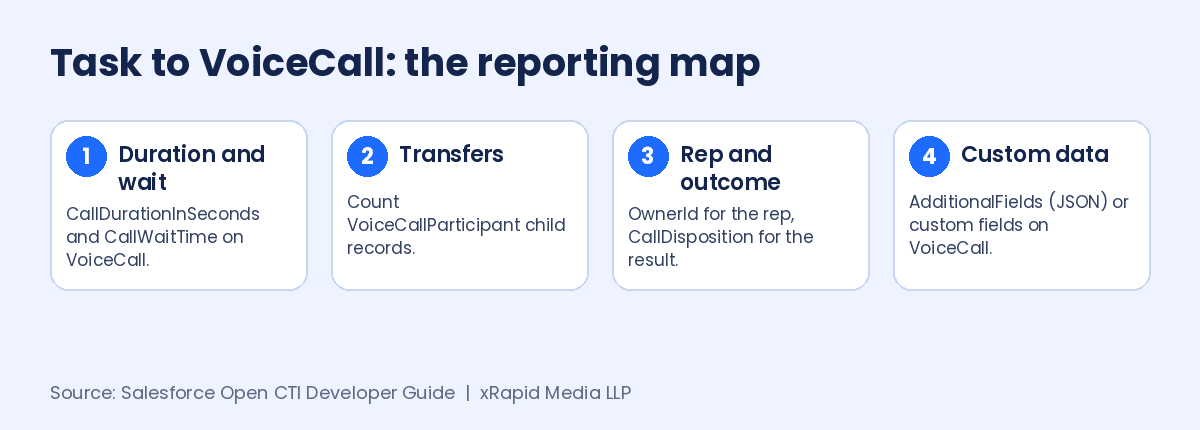
Salesforce maps common custom call metrics to Salesforce Voice equivalents:
- Call duration becomes VoiceCall.CallDurationInSeconds.
- Queue wait time becomes VoiceCall.CallWaitTime.
- Transfer count comes from VoiceCallParticipant child records.
- Recording URL becomes VoiceCallRecording.MediaDocumentId.
- Rep who answered becomes VoiceCall.OwnerId.
- Disposition becomes VoiceCall.CallDisposition.
- Custom fields go into VoiceCall.AdditionalFields (JSON) or custom fields.
Two points matter here. First, transfers are no longer a single number on one record. You count participant child records, so report types need to join VoiceCall to VoiceCallParticipant. Second, custom data has a choice: a JSON field that is flexible but harder to report on, or proper custom fields that are easier to filter and chart. For anything a manager filters by, custom fields are usually the safer pick.
A five-step reporting plan
Salesforce’s migration checklist asks teams to inventory custom fields on CTI-created Tasks and map them to VoiceCall or other target objects. Building on that, here is a practical order of work:
- Inventory. List every report, dashboard, flow and trigger that reads Task call fields. Note who uses each one.
- Map. Match each field to its VoiceCall equivalent using the table above. Flag anything with no clear match.
- Rebuild. Create VoiceCall report types and rebuild the reports managers actually use. Retire the rest.
- Run in parallel. During a pilot, compare old Task reports and new VoiceCall reports for the same queue to check the numbers line up.
- Set a switchover date. Historical Task data stays where it is, so pick a date after which reports read VoiceCall only, and tell managers in advance.
Salesforce also notes that for Salesforce Voice with Native Telephony you can configure prebuilt reports and dashboards, and that the Voice CRM Analytics app offers ready-made dashboards for other Voice telephony models. Check those before you build from scratch.
Common pitfalls to watch for
A few problems come up again and again in reporting rebuilds. Flows and triggers that create follow-up work from a call Task will stop firing once calls land on VoiceCall, so automation needs the same review as reports. Scheduled report emails keep sending the old Task version unless someone updates the subscription. And if managers export call data to spreadsheets or a BI tool, those exports need new field names too. Add each of these to your inventory so nothing goes quiet without warning.
What this means for your contact center
- Start with reporting, not finish with it. It is the part most likely to slip and the part leaders notice first.
- Expect a data gap. Trend lines across the cutover will span two objects. Decide how you will show both.
- Check vendor-specific objects. Some telephony vendors add their own call objects linked to VoiceCall, so ask yours.
- Clean up as you go. A migration is a good time to delete reports nobody reads.
- Test with real calls. Make sure transfers, recordings and dispositions show up as expected before you move more agents.
If you are comparing vendors while you plan, Partner Contact Center Powered by Vonage runs on Salesforce Voice, and Vonage Contact Center for Salesforce brings voice, video, WhatsApp, SMS, chat and email into the same Salesforce workspace.
Planning your Open CTI migration?
xRapid Media LLP is a High Tech B2B Marketing company and Premier Vonage Channel Partner. Book a free consultation with a Vonage contact center expert with 20 years of experience, and we will help you compare your options and map a clear, low-risk path to Salesforce Voice, with voice, video, WhatsApp, SMS, chat and email in one workspace.
Get a free Vonage consultation More Open CTI migration news →